



OSS Sandpit – Hidden Single Points of Failure: Routes That Look Diverse but Aren’t
OSS Sandpit – Hidden Single Points of Failure: Routes That Look Diverse but Aren’t Ask any network planner whether their important sites are protected and

Every NOC has lived this moment. The alarm list lights up, dozens of red rows appear at once, and the first question from the duty manager isn’t “what broke?” It’s “who’s affected, and how bad is it?”
This article provides a walkthrough of the Assurance module of our Personal OSS Sandpit Project, which sets out to answer that question. The Assurance module refers to the “Real-time” box in the high-level conceptual “Personal Sandpit” architecture below.

I’m Vishvesh Trivedi, an OSS automation architect based in Auckland, and Ryan kindly invited me to build this next building block with him. His earlier articles built out the Resource / Inventory module in Kuwaiba, with prototypes for 5G, GPON, fixed wireless, power networks and more. This module adds Assurance / Real-time from the original plan.
The idea is simple. An assurance tool knows what is unhealthy. An inventory knows what depends on it. Put them together and an alarm on a port becomes a list of services, customers and SLAs at risk.
The sandpit uses two open-source platforms for this:
.
Neither needed building from source. Both run as their official Docker containers, started together by one docker compose file, so the whole sandpit comes up with a single command:
| Container | Image | Opens on |
|---|---|---|
| OpenNMS | opennms/horizon:36.0.4 | :8980/opennms (admin / admin), traps on UDP 1162 |
| Kuwaiba | neotropic/kuwaiba:v2.1.1 | :8080/kuwaiba (web UI), :8081 (SOAP API) |
| PostgreSQL | postgres:16 | OpenNMS’s database |
OpenNMS needs the database container to be healthy before it starts, and Kuwaiba brings its own Neo4j graph database inside the image. The official instructions are worth following rather than repeating here: OpenNMS Horizon’s containerised deployment guide and the Kuwaiba documentation. Ryan’s Resource / Inventory module article covers the Kuwaiba side in more depth.
The pleasant surprise was how little modelling work Kuwaiba needed. Its default database already ships with the data types this use-case depends on: MPLSRouter, Building, City, State, Country, Room, Rack, Slot, IPBoard, ODF, OpticalLink, WireContainer, and the service and customer classes.
I didn’t create a single new class or attribute. All the sandpit does is create new instances of types that were already there, which is a good sign that the data model was designed by someone who has modelled real networks.
There are five steps:
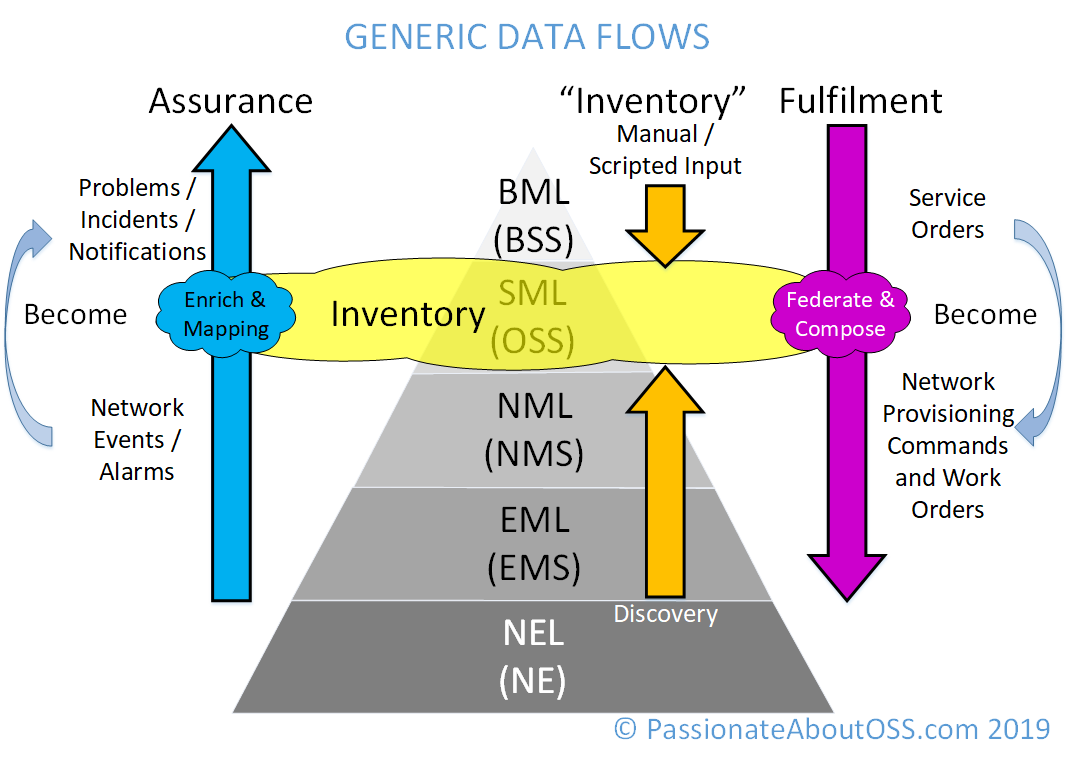
It’s effectively the blue flow overlaid onto the high-level TMN-pyramid below:
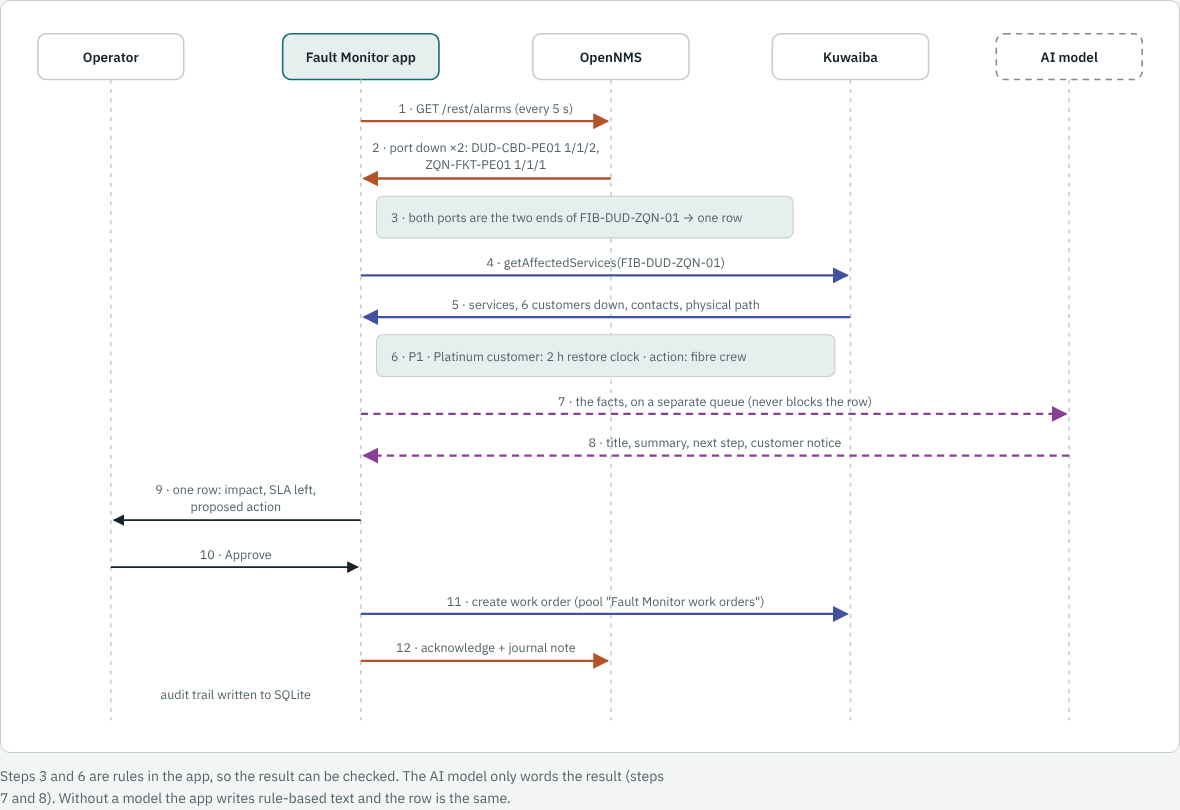
The diagram below shows the whole journey for one fault, a fibre cut between Dunedin and Queenstown, from the first alarm to an approved work order. OpenNMS raises the alarms, the Fault Monitor groups them, Kuwaiba returns the customers affected, and Approve creates a work order.
[Click on the image for a closer look]
.
To make the impact story believable, the sandpit needed a network that feels like a real operator’s. So it now models a fictional New Zealand operator, built into Kuwaiba from a single readable file:
The physical modelling matters more than it might seem. Kuwaiba holds the whole path:
Without that, a fibre cut can’t be traced to the services riding on it.
That’s the path through the Physical Layer in the sample diagram below (what we refer to as the East-West relationships in the diagram):
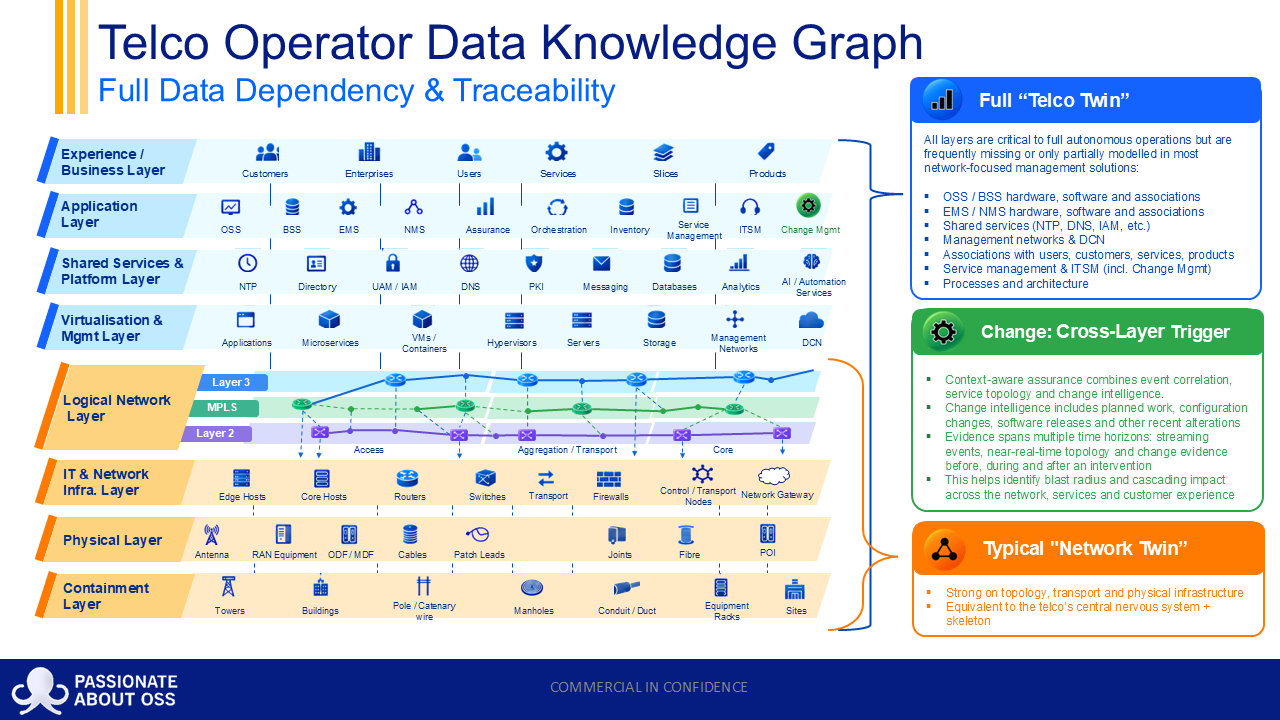
And each of those objects can be traced up through the layers to the Customer / Services in the Experience / Business layer in the diagram above. That’s what we refer to as the North-South relationships in the diagram.
Without these North/South + East/West relationships, or topology awareness, a fibre cut can’t be traced to the services riding on it.
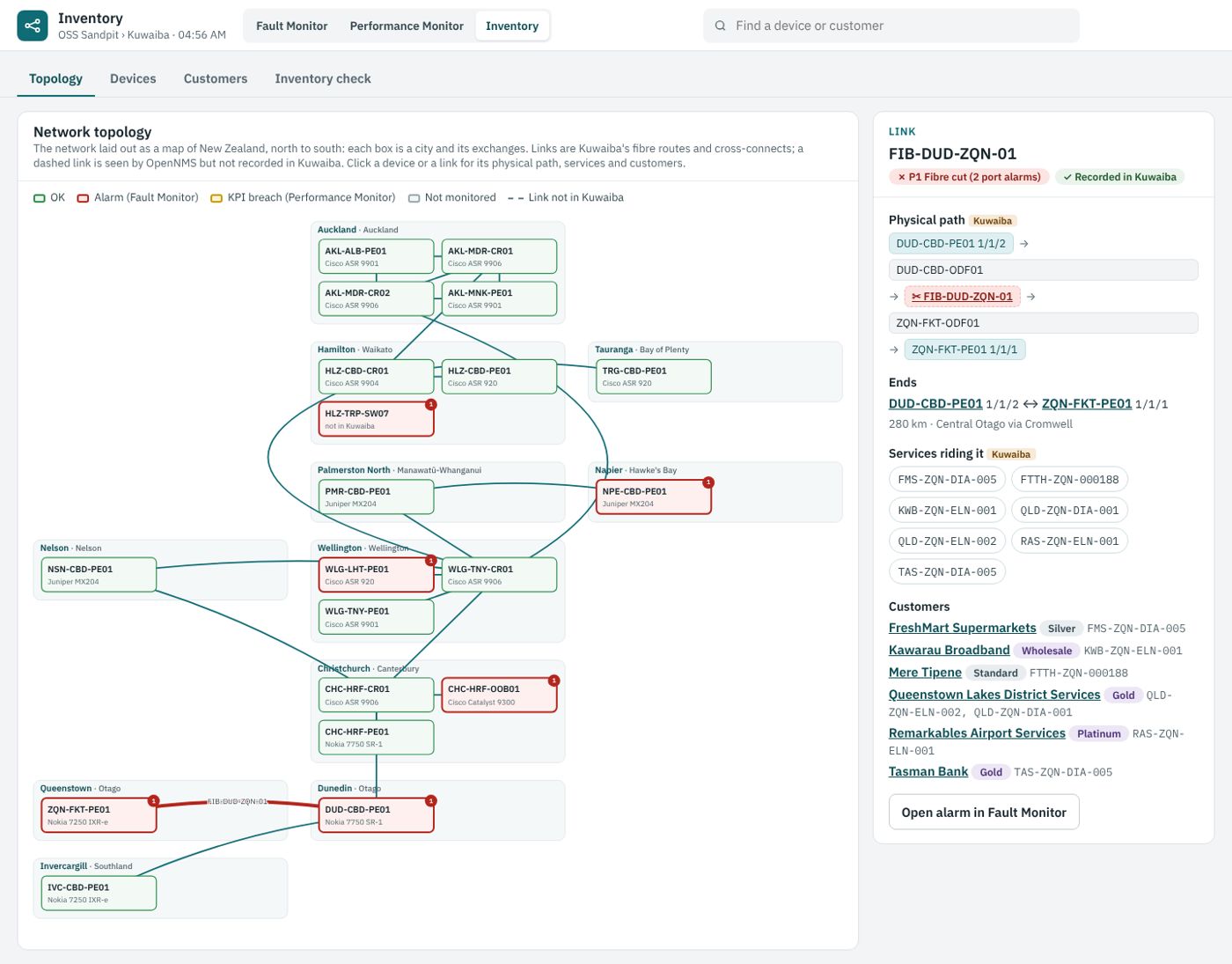
A few sites (Napier, Queenstown, Invercargill and T?kaka) are deliberately single-homed, which means they don’t have diversity available. A cut on their only route takes their customers down, which makes the impact easy to see.
The map below shows the network, with the Dunedin to Queenstown fibre selected and its customers listed alongside.
[Click on the image for a closer look]
.
OpenNMS is the sandpit’s “smoke alarm and heart-rate monitor”. It pings and polls devices, receives SNMP traps, and turns events into alarms.
The sandpit uses two kinds of fault:
The agent is Net-SNMP (snmpd), the standard Linux one, installed into a small Debian-based container with apt-get install snmpd.
Nothing exotic, which is the point: OpenNMS is talking to a genuine SNMP agent over UDP 161, not to a mock.
The work is in making that agent look like the Kuwaiba device it stands for. A start-up script writes /etc/snmp/snmpd.conf from a handful of environment variables:
sysName      HLZ-CBD-CR01       # the Kuwaiba device name
rocommunity  public default     # SNMPv2c, read-only, lab only
interface    eth1 6 10000000    # 10 Mbit/s, so a test can fill it
override .1.3.6.1.2.1.31.1.1.1.1.<ifIndex> octet_str "Te0/0/0/1"  # ifName
override .1.3.6.1.2.1.2.2.1.2.<ifIndex>    octet_str "Te0/0/0/1"  # ifDescr
Those two override lines do the heavy lifting. A container’s interfaces are called eth0, eth1, eth2; a Cisco router’s are called Te0/0/0/1. Overriding ifName and ifDescr means OpenNMS discovers the port under the same name Kuwaiba records, so an alarm on Te0/0/0/1 can be looked up in the inventory directly. ifHighSpeed is set to 10 Mbit/s, which is why a few megabits of test traffic is enough to cross a utilisation threshold.
Beside snmpd runs a small Python control agent. It exposes an HTTP endpoint the Fault Monitor calls to break the device on purpose (take a port down, stop the agent, push traffic), and when a port changes state it sends a linkDown or linkUp trap to OpenNMS on UDP 1162.
In OpenNMS, these three are provisioned as a requisition called sandpit-lab, with the ICMP and SNMP detectors enabled so OpenNMS polls them properly. The demo devices use a separate requisition with no detectors at all, so OpenNMS never tries to poll addresses that don’t exist.
Note: the device name is the shared key. The router’s name in Kuwaiba is also its node label and “foreign ID” in OpenNMS, and its SNMP sysName, so an alarm can be matched to inventory without a lookup table.
The five demo scenarios need to happen on cue during a walkthrough, on devices that don’t exist as containers. OpenNMS has a clean way to do this: its event bus accepts events over REST, and they flow through exactly the same path as an event from a real device.
Each one is an HTTP POST of a small XML document to /opennms/rest/events:
<event>
  <uei>uei.opennms.org/nodes/nodeDown</uei>
  <source>fault-monitor-demo</source>
  <nodeid>42</nodeid>
  <severity>Critical</severity>
</event>
OpenNMS receives it, applies its own event configuration, and raises an alarm. Nothing downstream knows or cares that it didn’t arrive as a trap. The whole demo is a short list in a YAML file:
# Case 5: fibre cut, Dunedin to Queenstown. Both ends report a port down.
- {device: DUD-CBD-PE01, event: portDown, port: 1/1/2, severity: Major}
- {device: ZQN-FKT-PE01, event: portDown, port: 1/1/1, severity: Major}
The same file also records what Kuwaiba must look like for each case to make sense, and the seed script checks every one before sending the alarms. That matters for case 3, where the whole point is that a port is missing from the inventory: if someone quietly fixed the record, the demo would silently stop demonstrating anything.
.
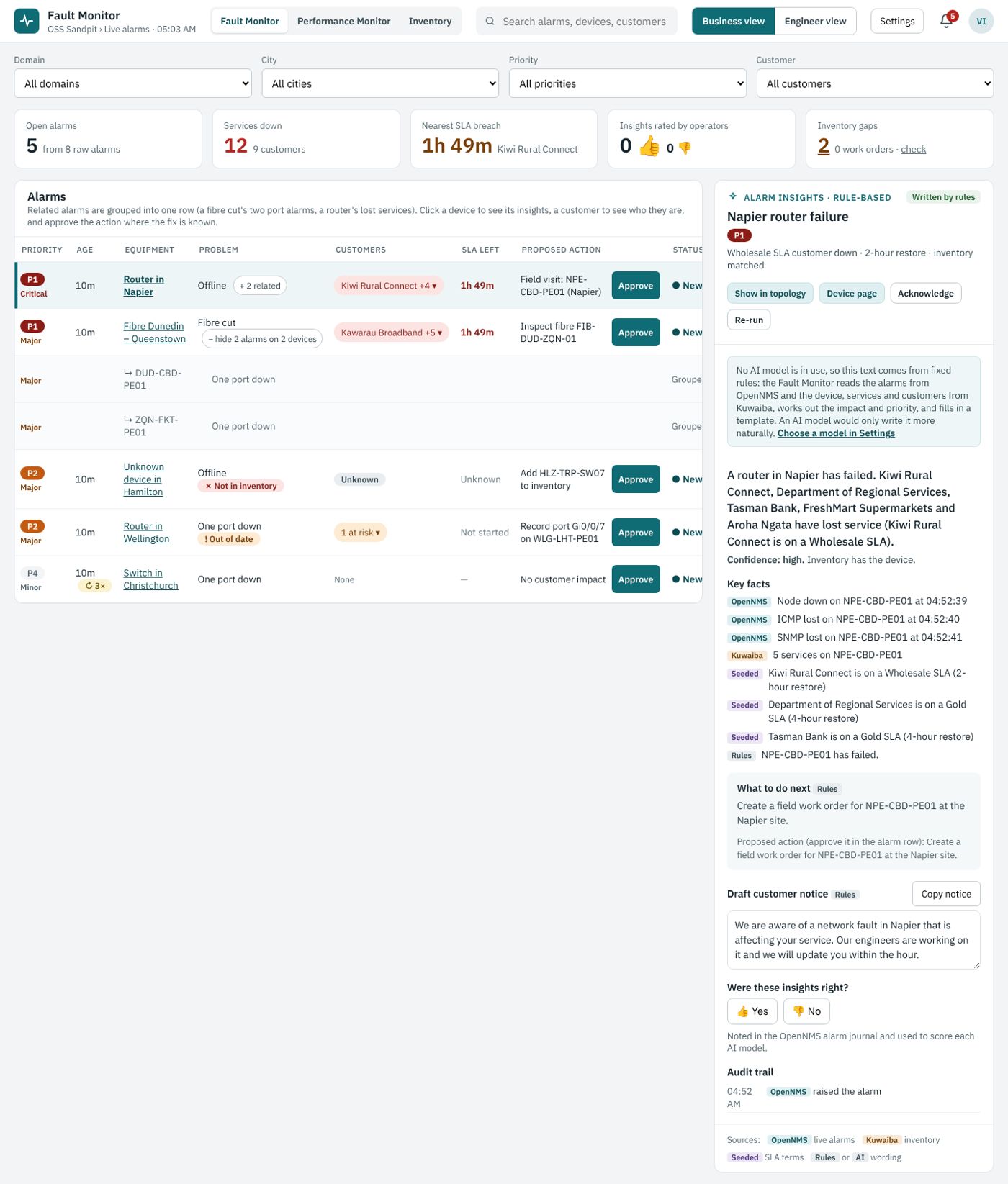
A single fibre cut usually produces at least two alarms, one at each end. Show them as two rows and the operator has to work out that they’re the same problem.
The sandpit’s Fault Monitor reads the alarms from OpenNMS’s REST API every few seconds and groups related ones. When the two alarmed ports sit at opposite ends of the same fibre in Kuwaiba, they become one row named after the fibre: “Fibre Dunedin – Queenstown”.
.
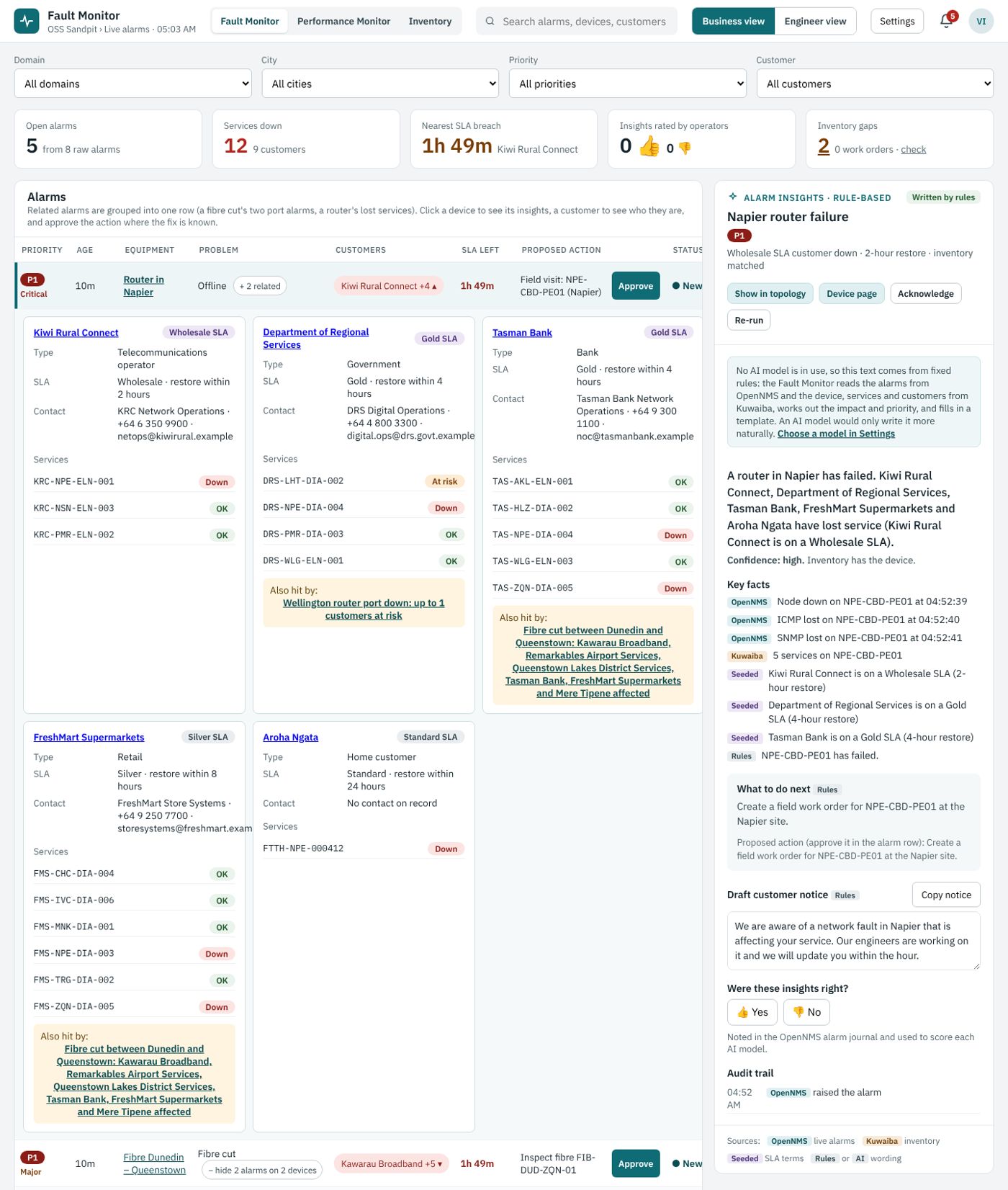
This is the heart of it. For each row, the alarm is turned into something Kuwaiba can understand: a structured descriptor such as device;slot;port, or a connection name such as the fibre ID. Kuwaiba’s getAffectedServices then follows the relationships and returns:
For the Dunedin to Queenstown cut, that’s six Queenstown customers down, including an airport services company on a Platinum SLA and a wholesale ISP.
Opening the row shows them, with their SLA and services.
[Click on the image for a closer look]
Note: Charles Bedón, Kuwaiba’s creator, made a valuable point when he reviewed this flow. Impact analysis can take longer than handling alarms, so in an alarm storm it should run on its own path. In the sandpit, alarms never wait for Kuwaiba: lookups are cached, and a slow answer simply shows impact as “unknown” for a moment. A fully separate impact path is on the list to explore.
.
With the impact known, simple rules do the rest. These run in the Fault Monitor, not in OpenNMS: the app reads the alarms over the REST API and applies its own rules, which keeps the operator’s priorities separate from the monitoring system’s severities. OpenNMS says major; the business says P1, because a 2-hour SLA customer is down.
Each row also carries the one-line reason for its priority, such as “Wholesale SLA customer down · 2-hour restore · inventory matched”. An operator can disagree with the rule, but never has to guess what it did.
Approve creates a work order in Kuwaiba and adds a note to the alarm in OpenNMS. It never touches the network.
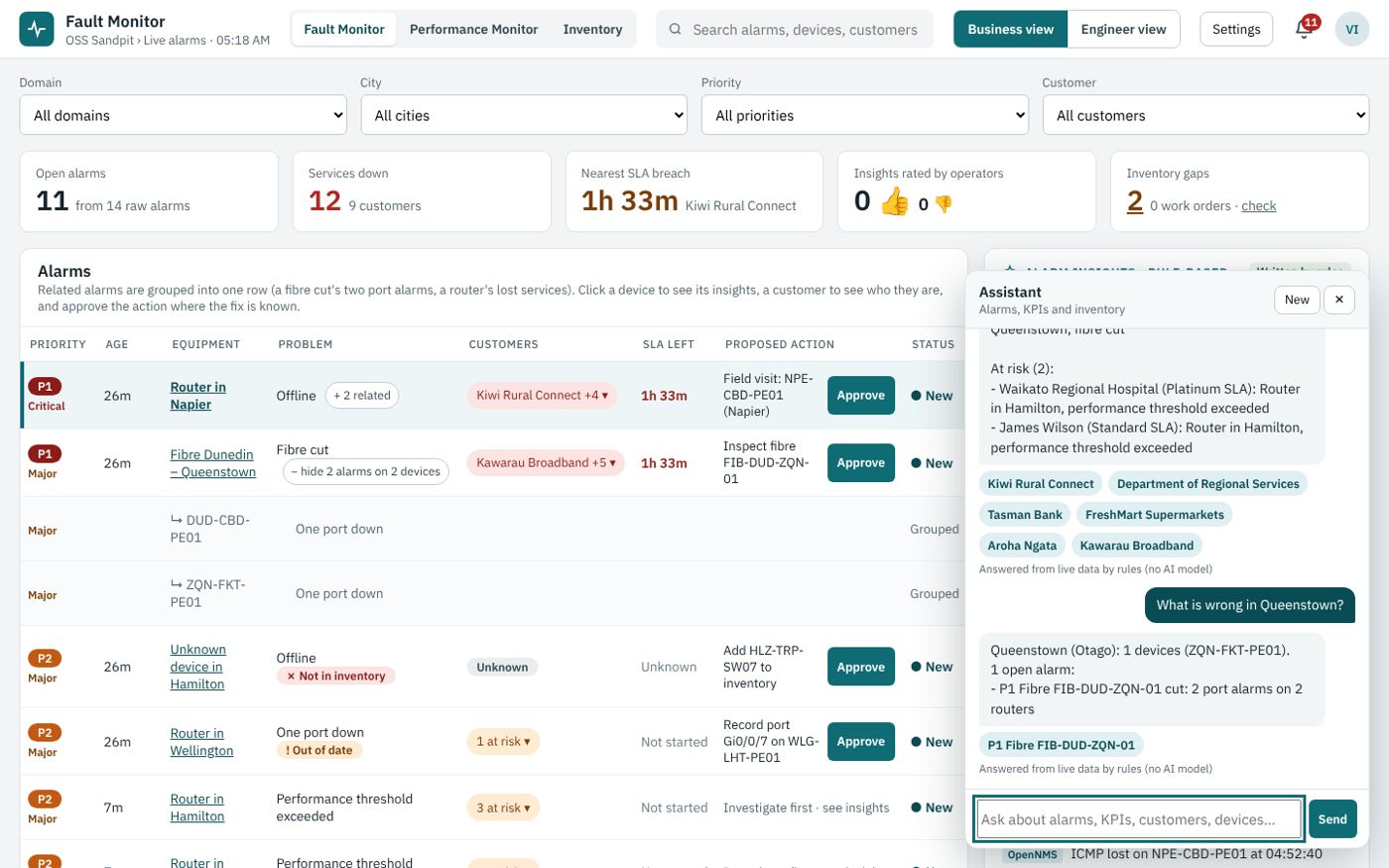
The screenshot below shows the Fault Monitor: one row per problem, with the customers affected, SLA time left and the proposed action.
[Click on the image for a closer look]
.
Two of the five demo cases are there to show what happens when the inventory isn’t right:
It’s the most useful lesson in the module. Same alarms, same tools: when the inventory is right, the answer is exact.
When it isn’t, the answer is wide or unknown.
If you add AI on top, the same applies. The AI is only as good as the inventory behind it.
.
The sandpit can also use an AI model to word each row: a short summary, a next step and a draft customer notice. It’s deliberately limited to that.
Which alarms belong together, who’s affected, priority and the SLA clock all come from OpenNMS, Kuwaiba and fixed rules, so the results can be checked and work the same with no AI at all.
There’s also an Assistant that answers questions from live data, such as “which customers are affected?”
[Click on the image for a closer look]
Behind it sits a read-only MCP server for Kuwaiba. MCP is a standard way for AI tools to look things up through a fixed set of safe actions, such as “find a device”, “trace a fibre” or “which services are affected”. That’s a topic for a future article.
.
This module adds assurance to the sandpit’s inventory:
I hope you enjoyed this brief introduction to how we’ve connected alarms to customer impact in the Assurance module of our Personal OSS Sandpit Project. Click on the link to step back to the parent page and see what other modules and use-cases are available for review.
My thanks to Ryan for the sandpit and the invitation to write, to Charles for his review of the design, and to Craig Gallen, whose Kuwaiba–OpenNMS work this builds on.
If you think there are better ways of linking assurance and inventory, or there are other assurance scenarios you’d like to see in the sandpit, I’d love to hear them in the comments below.

OSS Sandpit – Hidden Single Points of Failure: Routes That Look Diverse but Aren’t Ask any network planner whether their important sites are protected and

Across this series, we’ve looked at fragmented AI investment, the rush to launch AI projects, the AI dependence on OSS and BSS, and the need
So far in this series, we’ve looked at fragmented AI investment (shadow AI), the rush to get involved in AI, and what happens when those
In the first two articles in this “Shadow AI” series, we looked at two problems: fragmented AI investment and the rush across organisations to get