

OSS Sandpit – Assurance Module: From Alarm to Customer Impact
Every NOC has lived this moment. The alarm list lights up, dozens of red rows appear at once, and the first question from the duty

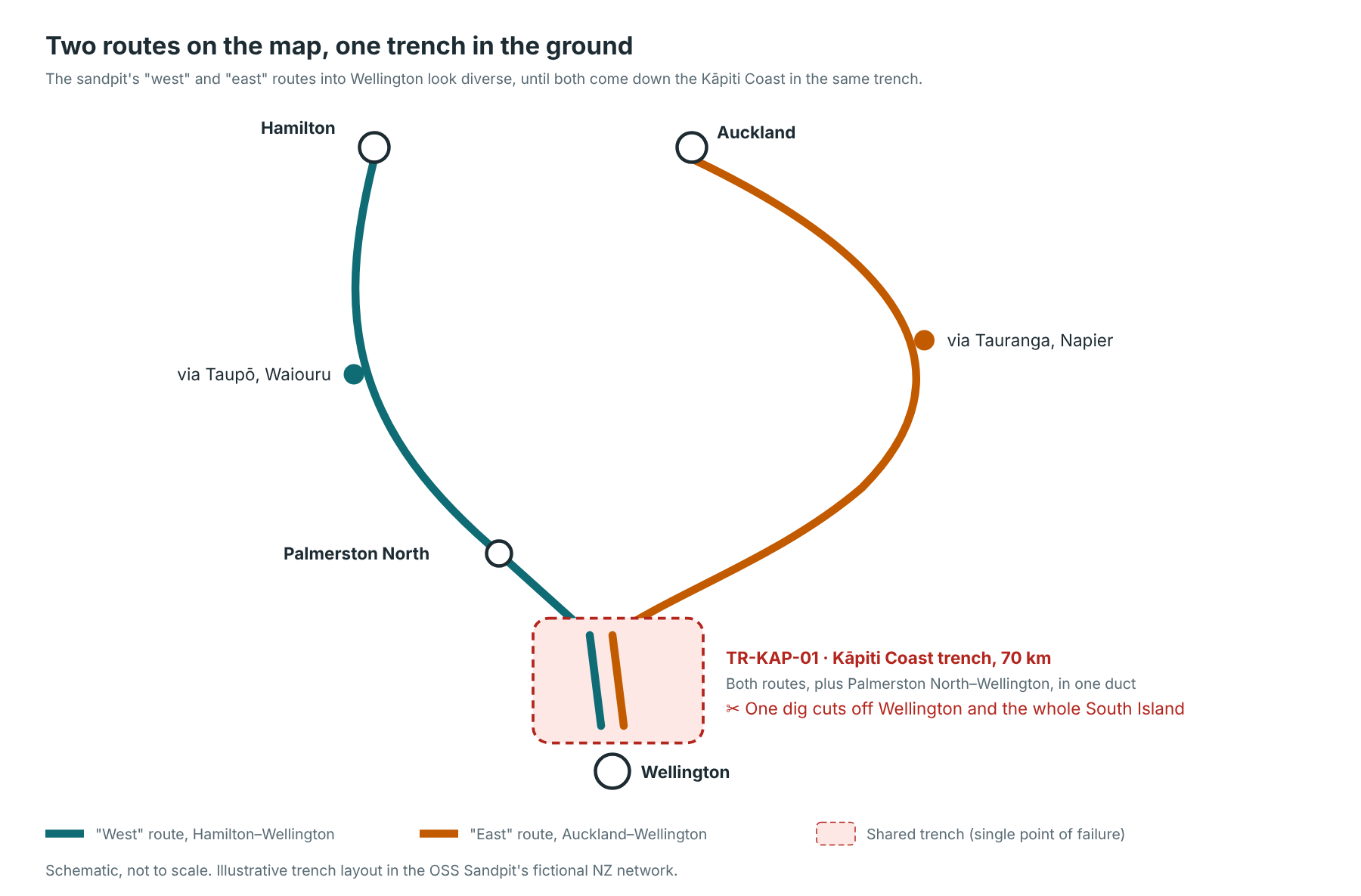
Ask any network planner whether their important sites are protected and the answer is usually yes: there are two routes, an “east” and a “west”, so if one is cut the other carries the traffic. On the map, the two lines are nicely apart.
Then a digger goes through a trench on a quiet stretch of road, and both routes go down at once. For part of the way, they were in the same hole in the ground.
This article provides a walkthrough of how the Personal OSS Sandpit Project finds these hidden single points of failure from the inventory, before the digger does. It builds on the Assurance module from my first article, and on Ryan’s Resource / Inventory module in Kuwaiba. Same two containers as before – Kuwaiba v2.1.1 for the inventory and OpenNMS Horizon 36.0.4 for the alarms – with the sandpit’s own Python app between them. Nothing new was installed for this; the work is all in what gets recorded and what gets asked of it.
As Ryan pointed out when he saw it, a single point of failure (SPoF) hurts twice. It is a risk to the network, and it is a particular problem for customers who have paid for diversity, only to lose service to a shared trench that nobody knew about.
There are four steps:
The diagram below shows the idea on the sandpit’s New Zealand network. The “west” route from Hamilton and the “east” route from Auckland look diverse all the way down the North Island, until both come down the Kapiti Coast into Wellington in the same trench.
Alarms and topology views show fibres, not the holes they are buried in. So the first step is to put the holes in the inventory.
The diagram below is used for a different purpose, but it clearly shows the difference between the physical layer (the fibres shown in alarm and topology view) versus the containment layer (the holes / ducts / trenches).
The interesting thing about the diagram below shows that it’s possible for there to be diversity in one layer (eg the physical / fibre layer) but lack of diversity in another (eg two physical cables passing through the same manhole or conduit / duct, or potentially even mounted to the same pole).

In Kuwaiba, a trench or duct is recorded as a WireContainer: a physical connection between two buildings. The fibres that run inside it are then moved into it, so Kuwaiba knows that, for example, three fibres share the 70 km trench down the Kapiti Coast.
WireContainer is one of Kuwaiba’s stock classes, like the MPLSRouter, Building and OpticalLink classes the first article used. As there, no class and no attribute was created for the sandpit. Only instances.
Each trench is one line in the sandpit’s network file, naming the two ends, the corridor it follows, how long it is and which fibres run inside it:
trenches:
  - {name: TR-KAP-01, a: PMR-CBD, b: WLG-TNY, km: 70,
     corridor: "K?piti Coast, ?taki to Wellington (State Highway 1)",
     fibres: [FIB-HLZ-WLG-01, FIB-AKL-WLG-02, FIB-PMR-WLG-01]}
When the app starts it turns each of those into two SOAP calls against Kuwaiba. The first creates the container between the two buildings; the second moves the fibres inside it:
tid = self.k.call(
    "createPhysicalConnection", "Building", a, "Building", b,
    t["name"], "WireContainer", None)
inside = [links[f] for f in t["fibres"]]
self.k.call("moveSpecialObjects", "WireContainer", tid,
            ["OpticalLink"] * len(inside), inside)
It reads back the WireContainers under our own country first and adds only the ones that are missing, so a restart doesn’t create a second copy of every trench.
The five trenches in the sandpit today are:
Note: operators don’t publish where their fibres share a trench, so this layout is illustrative. Two of the trenches were set up deliberately as hidden risks, to show the method working.
A site is only working if it can reach the rest of the world. In the sandpit, that is the gateway: the Auckland exchange where the international cables land and the internet peering happens.
So the question for every trench becomes: if this trench is dug up, which sites can no longer reach Auckland?
The sandpit answers it from the topology Kuwaiba already records: every router, every fibre between them, and the patch cords inside each exchange.
The check itself runs in the Inventory tool, not in Kuwaiba. Kuwaiba supplies the facts over SOAP – the devices, the fibres between them, and the contents of each trench – and the Inventory tool holds them as a graph and does the analysis. It is under a hundred lines of Python with no graph library behind it: a breadth-first walk outwards from the gateway, skipping any fibre that is in the cut.
def reachable(adj, start, cut):
    # devices reachable from `start` without using any link in `cut`
    seen, todo = set(start), deque(start)
    while todo:
        d = todo.popleft()
        for (nb, link_id) in adj.get(d, ()):
            if nb in seen or link_id in cut:
                continue
            seen.add(nb)
            todo.append(nb)
    return seen
Note: patch cords inside one exchange are left out of the “what can be dug up” list. You can’t put a digger through a patch panel.
Knowing what a dig cuts off isn’t enough on its own. Queenstown hangs off a single fibre, so a cut there takes it down, but everyone already knows that. A network designer has already made the cost vs risk trade-off calculation and decided to proceed at risk without diversity.
The interesting sites are the ones that look protected. So the check runs two passes over the same graph.
Pass one, one fibre at a time. It cuts each fibre that runs between two sites, one after another, and notes who loses their path to the gateway. Anything that survives every single cut is counted as protected: on paper, it has diversity.
baseline = reachable(adj, gw, set())
# only fibres between two sites can be dug up
dug = [i for i, (a, b) in ends.items() if site_of[a] != site_of[b]]
exposed = set()
for i in dug:
    exposed |= baseline - reachable(adj, gw, {i})
protected = baseline - exposed
Pass two, a whole trench at a time. It cuts every fibre in the trench at once, and compares what is lost against that protected set:
lost = baseline - reachable(adj, gw, cut)
hidden = lost & protected
verdict = "hidden" if hidden else "single" if lost else "none"
That one comparison is the whole idea:
On the sandpit’s network, two of the five trenches are hidden risks:
Every one of those Wellington and South Island sites survives any single fibre cut, which is exactly why the network looks resilient (at the physical layer). The trench model shows that it isn’t (at the containment layer).
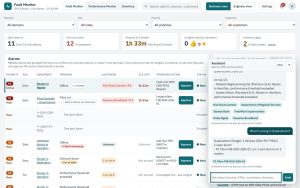
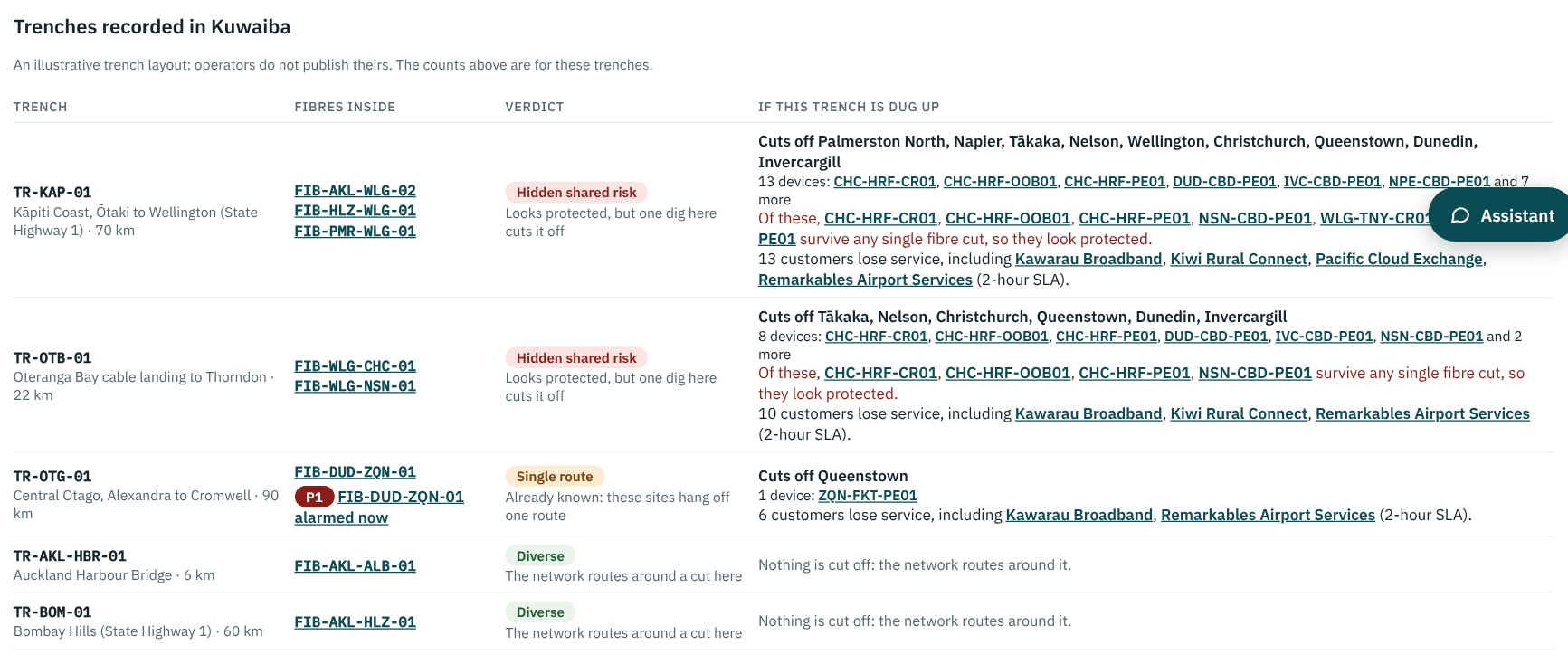
The screenshot below shows the result in the sandpit’s Inventory tool, under Route risks, worst first.
[Click on the image for a closer look]
Each row lists the fibres in the trench (with any alarm on them right now), the places and devices that would be cut off, and the customers who would lose service, with those on 2-hour SLAs first.
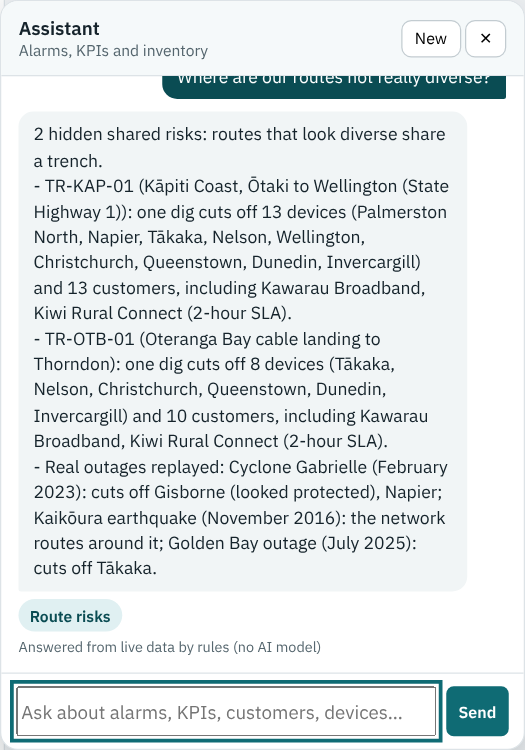
There are three ways to reach the same answer, and all three call the same function:
GET /api/inv/risks returns the whole analysis as JSON: each trench, its verdict, the devices and cities isolated, the customers behind them, and any alarm sitting on those fibres right now.That last one is how an AI model would get at this, as a tool it can call.
The point is the same one as in the first article: the model can word the finding and put it in front of someone, but it can’t invent one, because the finding was computed before the model ever saw it.
[Click on the image for a closer look]
Interesting Note: when I first built the data set for this, the Oteranga Bay landing building was created under the wrong Wellington. Kuwaiba’s sample data has its own “New Zealand”, complete with a Wellington, and a lookup by name found that one first. Kuwaiba then refused to create the duct, because the two ends had no common parent. The fix was to look up places only under our own country. It’s a small thing, but a common “gothcha” because any real inventory will have easily mistaken look-alike names like this too.
Ryan framed this nicely. When a check like this flags a shared trench on a real network, it is a result of one of three things:
The third is where a tool like this earns its keep, and the second is a good reason to keep the physical inventory accurate. As in the Assurance module, the answer is only as good as the inventory behind it. If the trenches aren’t recorded (and many carriers do totally overlook the containment layer in the second picture above), there’s no way of the risk being seen.
This module adds a single point of failure check to the sandpit’s inventory:
In the next article, I take this beyond trenches and replay three real New Zealand outages on the network: Cyclone Gabrielle, the Kaikaura earthquake and the Golden Bay outage.
I hope you enjoyed this brief introduction to how we’ve found hidden single points of failure in the inventory of our Personal OSS Sandpit Project. Click on the link to step back to the parent page and see what other modules and use-cases are available for review.
My thanks to Ryan for the sandpit, to Charles Bedón for Kuwaiba and his earlier review of the design, and to Craig Gallen, whose Kuwaiba–OpenNMS work this all builds on.
If you’ve seen a “diverse” route fail in an unexpected way, or think there are better ways of finding these risks, I’d love to hear about it in the comments below.

Every NOC has lived this moment. The alarm list lights up, dozens of red rows appear at once, and the first question from the duty

Across this series, we’ve looked at fragmented AI investment, the rush to launch AI projects, the AI dependence on OSS and BSS, and the need
So far in this series, we’ve looked at fragmented AI investment (shadow AI), the rush to get involved in AI, and what happens when those
In the first two articles in this “Shadow AI” series, we looked at two problems: fragmented AI investment and the rush across organisations to get