

You’re already Paying the Price for Bad Data. AI, AIOps and AN will raise it
Bad OSS data has been quietly draining BAU budgets for decades. But with AI, AIOps and Autonomous Networking (AN), we’re about to discover just how

Every inventory is out of date somewhere. A switch goes in during a late-night cutover and the paperwork never follows. A port is patched for a trial and stays in service for three years. A site is decommissioned on paper but still answers pings.
None of that matters on a quiet day. It matters at 2am, when an alarm comes in and the question is “who’s affected?” The inventory answers from what it recorded, not from what is actually out there, and nobody finds out it was wrong until the answer is already in front of an operator.
This article provides a walkthrough of inventory enrichment in the Personal OSS Sandpit Project: comparing what the network shows against what the inventory records, and turning each difference into a work order. It is the third of the sandpit’s assurance checks, after Alarm to Customer Impact and Hidden Single Points of Failure. It runs on the same two containers as those: OpenNMS Horizon 36.0.4 watching the network and Kuwaiba v2.1.1 recording it, with the sandpit’s own Python app reading both over their APIs. The comparison itself is about 75 lines.
There are four steps:
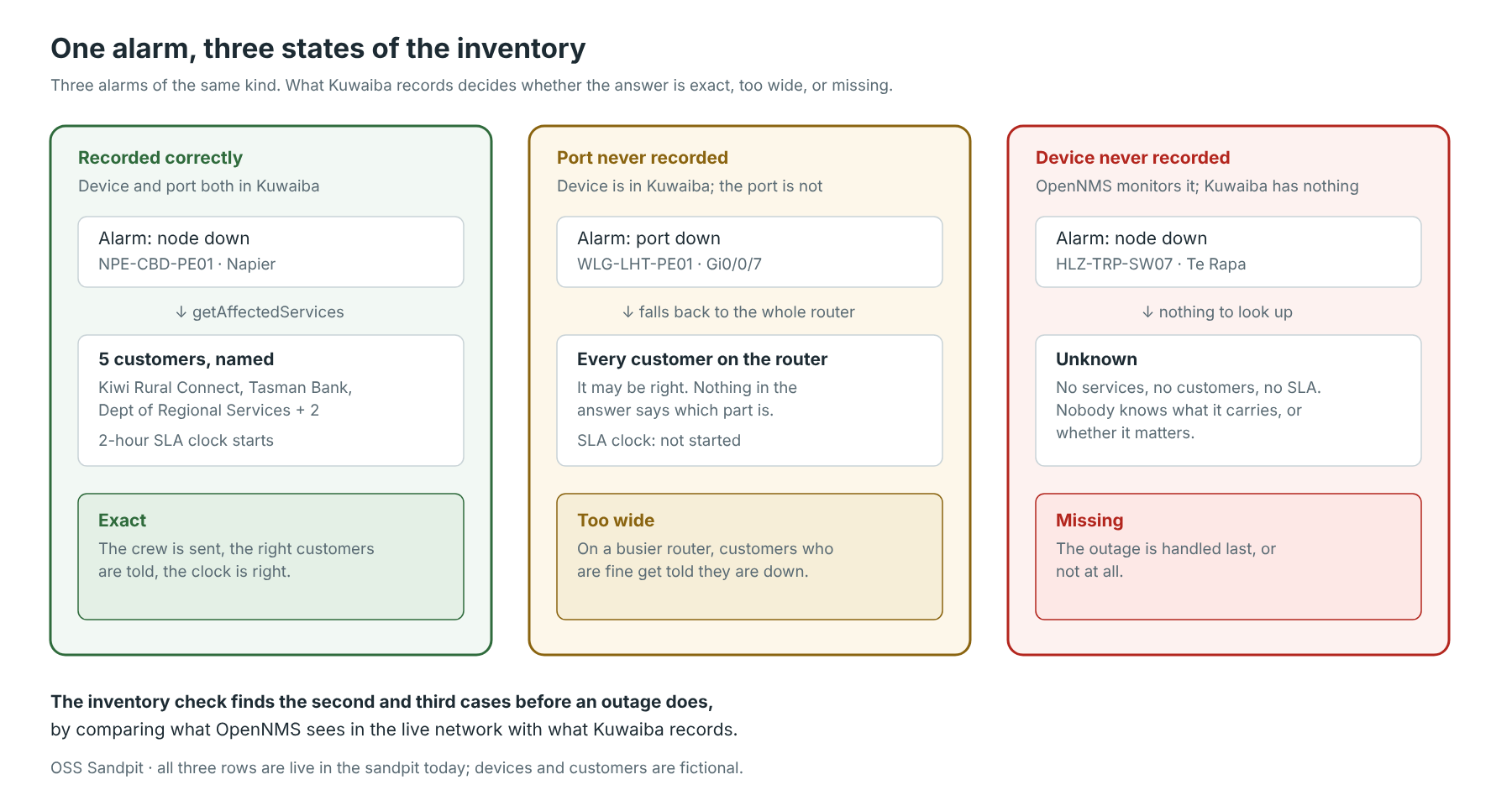
The diagram below shows why this matters. The alarm is the same kind of alarm each time. What Kuwaiba records decides whether the answer is exact, too wide, or missing altogether.
[Click on the image for a closer look]
Data quality is a hard thing to get funded. “Our inventory is 94% accurate” doesn’t move anyone, because nobody can picture the missing 6%.
So the sandpit doesn’t report accuracy. It reports what the gap does to a live outage:
All three of those are live in the sandpit right now. Two of the five demo faults exist specifically to produce the second and third cases.
Note: this is the same argument as the AI one from the first article. An AI model given a wrong inventory doesn’t say “I’m not sure”. It writes a confident, fluent customer notice naming the wrong customers.
The check is a comparison between two systems that already exist. Neither was built for this, and neither needed changing: both are asked over their normal interfaces.
From OpenNMS, the monitoring system, over its REST API:
GET /rest/nodes — every node it monitors, minus its own self-monitoringGET /rest/nodes/{id}/snmpinterfaces — the ports it can see on that node over SNMPand, separately, any port named in a current alarm. That second source matters, because a port with no SNMP data can still appear in an alarm.
From Kuwaiba, the inventory, over the SOAP API its documentation describes: the device record, and every port recorded underneath it, at any depth.
dev = self.kuwaiba.device(label)
row["live"] = set(self._live_ports(int(n["id"])))
row["in_inventory"] = dev is not None
row["recorded"] = {norm_port(p.name) for p in self.kuwaiba.call(
    "getChildrenOfClassLightRecursive", dev.id, dev.className,
    "GenericPort", 2000) or []} if dev else set()
GenericPort is the Kuwaiba class every port type inherits from, so one call covers optical ports, electrical ports and anything else a device carries. Again, these are all stock Kuwaiba classes: nothing was added to the data model for this.
Then the comparison, per device:
seen = live | alarm_ports.get(label, set())
missing = sorted(p for p in seen if norm_port(p) not in row["recorded"])
Two details make the difference between a useful list and a noisy one. Port names are normalised before comparison, because Gi0/0/7, gi 0/0/7 and GigabitEthernet0/0/7 are the same port:
def norm_port(name):
    n = re.sub(r"s+", "", name or "").lower()
    return re.sub(r"^gigabitethernet", "gi", n)
And loopbacks, management interfaces and OpenNMS’s own self-monitoring are filtered out by name prefix (lo, eth, docker, veth, br-), since nobody needs a work order for lo0.
Note: the device name is the key that makes this possible at all. A router’s name in Kuwaiba is also its node label and foreign ID in OpenNMS, and its SNMP system name. [Note: AlternateName can be used if there’s a mismatch, but not referenced in this example].
Without that one shared identifier, comparing the two systems means building a mapping table first, which is its own data quality problem. Charles Bedón made this point when he reviewed the sandpit’s design: every system must name a network item the same way, even though each models the network differently.
[Click on the image for a closer look]
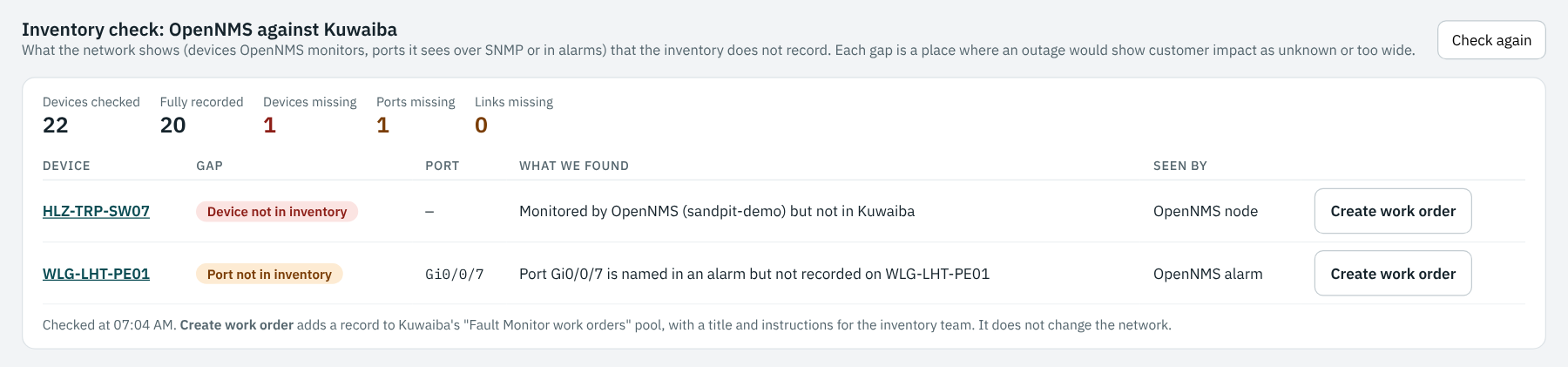
A list of problems that nobody owns is just a longer list of problems (which is the reason we suggest each telco should have a DOC – Data Operations Centre). Each row has a Create work order button, which writes a record into Kuwaiba’s own work order pool — getRootPools to find the pool, createRootPool the first time if it isn’t there yet, then createPoolItem to add the order:
pools = self.call("getRootPools", "WorkOrder", 1, True) or []
pool = next((p for p in pools if p.name == WORK_ORDER_POOL), None)
pool_id = pool.id if pool else self.call(
    "createRootPool", WORK_ORDER_POOL, "Created from the sandpit"
    " Fault Monitor", "WorkOrder", 1)
return self.call("createPoolItem", pool_id, "WorkOrder",
                 ["name", "description"], [name, description], None)
The order carries the device, what was found, and what the inventory team needs to ask:
Create a Kuwaiba work order to record port Gi0/0/7 on WLG-LHT-PE01, and ask the Wellington team which services use it.
That last clause is the important part. The check can see that a port exists. It cannot know what rides on it. Only the team that patched it knows, so the work order asks the question rather than guessing the answer.
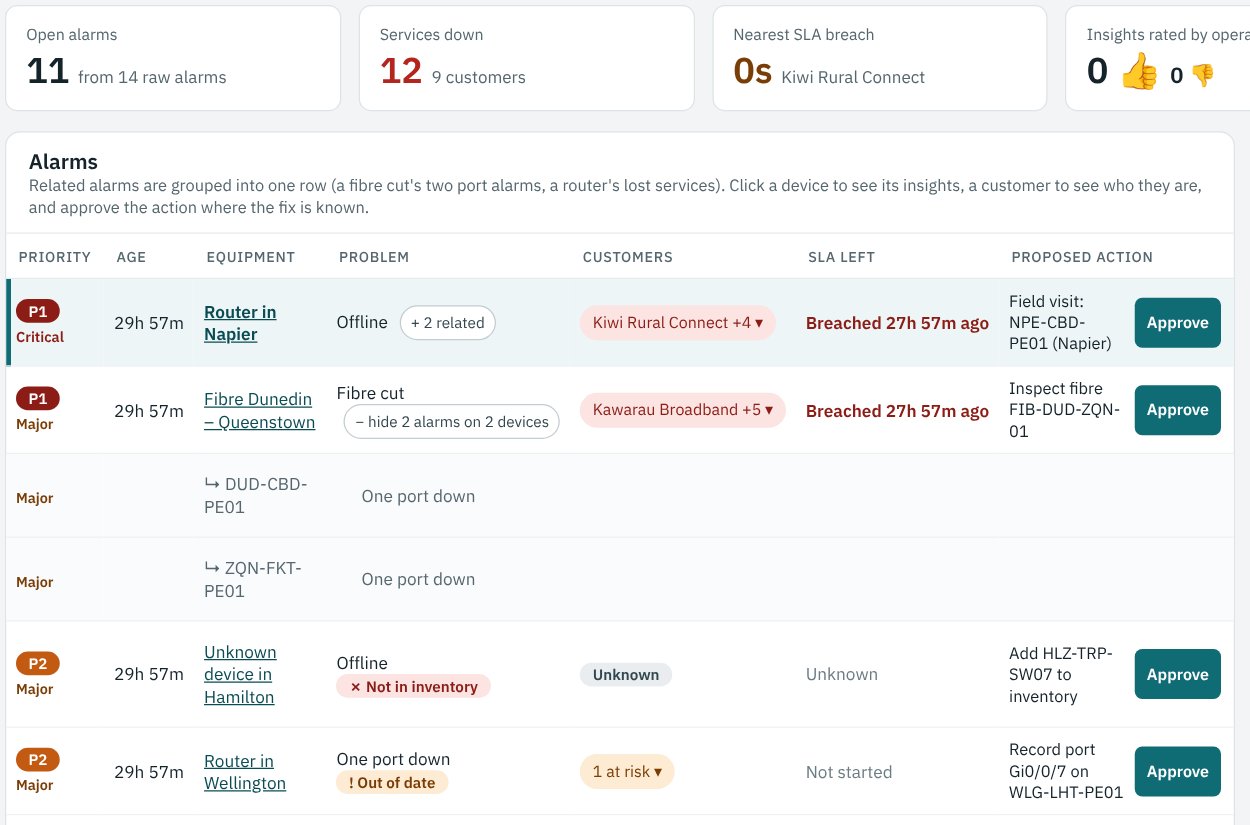
The same gaps appear in the Fault Monitor, on the alarms they affect: a row marked × Not in inventory with customers unknown, and a row marked ! Out of date where the port is missing. The proposed action on each is to fix the record.
[Click on the image for a closer look]
Note: nothing here edits the inventory automatically. It would be easy to have the check write the missing port into Kuwaiba, and tempting. But a port record with no service attached is a different kind of wrong: it looks complete and isn’t. A person closes the loop (possibly as a data-fix fault that’s then systematically processed by the DOC we discussed above).
A one-off audit decays from the day it finishes. The check runs continuously, on GET /api/inventory-check, and the gap count sits on the Fault Monitor’s front page next to the open alarms. The number going up is a signal in itself, usually that a change went in without the records following.
The slow part is the scan — one OpenNMS call and one Kuwaiba call per node — so that is cached for 60 seconds, while the alarm side is read fresh every time. On the sandpit’s 22 devices a cold scan takes a few seconds; on a real network the same pattern would run as a scheduled job rather than on a page load.
That turns data quality from a project into a measurement, and a measurement is something an operations team can actually be held to.
The check covers devices and their ports today. The same comparison extends naturally:
This module adds a continuous inventory check to the sandpit:
Each gap is shown as what it costs during an outage: impact that comes out unknown, or too wide.
I hope you enjoyed this brief introduction to how we’ve found the gaps in the inventory of our Personal OSS Sandpit Project. Click on the link to step back to the parent page and see what other modules and use-cases are available for review.
My thanks to Ryan for the sandpit, to Charles Bedón for Kuwaiba and the naming-identifier point this one leans on, and to Craig Gallen, whose Kuwaiba–OpenNMS work this all builds on.
What’s the worst inventory gap you’ve been caught by, and how did you find it? I’d love to hear about it in the comments below.

Bad OSS data has been quietly draining BAU budgets for decades. But with AI, AIOps and Autonomous Networking (AN), we’re about to discover just how
Your telco knows enough about you to identify you (via KYC mechanisms), bill you, market to you and manage your services. But does it understand
OSS Sandpit – What-If Analysis: Replaying Real Outages on the Network In February 2023, Cyclone Gabrielle cut every major fibre route into Hawke’s Bay and
Have you ever looked at the next rung of the corporate ladder and wondered whether that’s actually a job you’d want to do? When I